How to Customize Your Chrome New Tab: 4K Wallpapers, Focus Timers & App Shortcuts
Default browser new tabs are cluttered with algorithm-driven commercial links and distracting news feeds. Here is how to transform your new tab page into a breathtaking 4K productivity dashboard equipped with Pomodoro timers, ambient soundscapes, and fluid squircle app shortcuts.
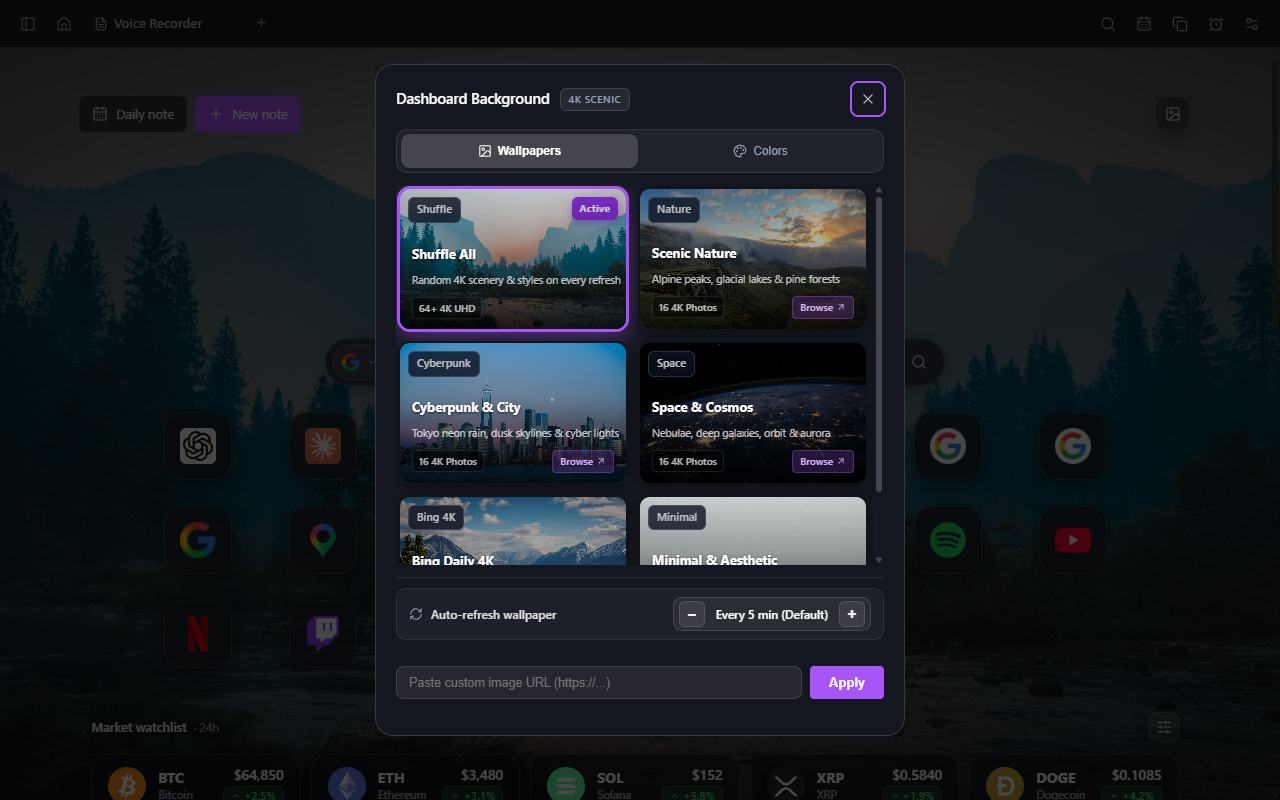 Vault NewTab: Hand-curated 4K scenic photography with dark vignette contrast for clear readability.
 The Problem with Default Chrome New Tabs
When you open a fresh tab in Google Chrome, you are greeted by low-resolution shortcuts, sponsored recommendations, and distracting articles. This visual clutter fragments your attention before you even begin working.
A truly productive new tab page should do the opposite: it should induce calm, inspire focus, and give you immediate access to the exact tools you need for deep work.
Pillar 1: 4K UHD Dynamic Wallpapers & Gallery
Visual environment shapes cognitive focus. Low-quality, pixelated backgrounds look amateur, while overly busy wallpapers make text unreadable.
Vault NewTab includes 64 hand-selected 4K UHD photographic backdrops across four visual collections:
- Scenic Nature: Alpine lakes, morning mountain mists, redwood canopies, and rugged coastal cliffs.
- Cyberpunk City: Neon-soaked rain streets, futuristic Tokyo alleyways, and nighttime skylines.
- Deep Space & Cosmos: High-resolution James Webb telescope captures, spiral galaxies, and stellar nebulae.
- Minimal & Aesthetic: Soft architectural shadows, subtle geometric gradients, and soothing earth tones.
Each wallpaper applies a subtle, calibrated dark vignette layer so that your clock, notes, and app shortcuts maintain optimal contrast in any lighting.
Pillar 2: Tactile Squircle Shortcuts & Folder Grouping
Traditional browser bookmarks force you into nested drop-down text menus that take multiple clicks to navigate.
Drag-and-Drop Folder Creation
Vault NewTab's app launcher uses Apple-inspired 18px rounded squircle tiles. Drag any two shortcuts together to automatically create a folder with 2x2 miniature icon previews. Group your AI tools (Claude, ChatGPT), developer portals (GitHub, Linear), or social media into organized clusters.
Automatic Favicon Detection
When adding custom bookmarks or local development links (like localhost:3000), Vault NewTab automatically retrieves the high-resolution vector icon directly from the domain.
Pillar 3: Circular Focus Timer & Deep Work Soundscapes
The Pomodoro technique (25 minutes of deep focus followed by a 5-minute cognitive reset) is proven to prevent mental burnout.
Instead of installing a separate timer extension that clutters your toolbar, Vault NewTab features a circular SVG progress ring directly on your dashboard.
- Custom Session Durations: Choose 25-minute Pomodoros, 45-minute deep focus sprints, or 10-minute quick reviews.
- Offline Sound Engine: Mix layered background audio—gentle rain on a window, a crackling hearth, quiet cafe murmur, or theta waves—with individual volume controls. No YouTube or Spotify tabs required.
Design your dream new tab dashboard
Install Vault NewTab free on the Chrome Web Store and experience aesthetic 4K focus today.
Pillar 4: Glanceable Local Weather & World Clocks
At the top of the dashboard, clean glanceable stats keep you informed without cluttering your thinking space:
- Keyless Weather Forecasts: Real-time temperature and condition icons powered by the privacy-first Open-Meteo API.
- Live Currency Converter: Cycle live exchange rate pairs (e.g.
USD/EUR,GBP/USD,EUR/JPY) with a single click. - Keyboard Search: Press / anywhere on the dashboard to immediately jump to the omnibar search.
Frequently Asked Questions
Do 4K wallpapers slow down Chrome tab opening times?
No. Vault NewTab locally caches high-resolution wallpapers in the browser's storage after initial load, ensuring that tabs open with zero latency in under 50 milliseconds.
Can I hide the dashboard and show only my notes?
Yes. Vault NewTab features a simple toggle in Settings to switch between the Full Dashboard mode and a Distraction-Free Pure Editor mode.
Transform Your Chrome New Tab Today
Experience hand-curated 4K wallpapers, fluid squircle shortcut folders, and integrated Pomodoro focus.
Add to Chrome