
The 7 Best Chrome New Tab Extensions for Notes in 2026 (Ranked & Tested)
The average professional opens over 40 new tabs every day. Yet most default new tab pages waste that space with commercial link spam. We benchmarked the 7 top new tab Google Chrome extensions for notes to help you find the ultimate distraction-free writing dashboard.
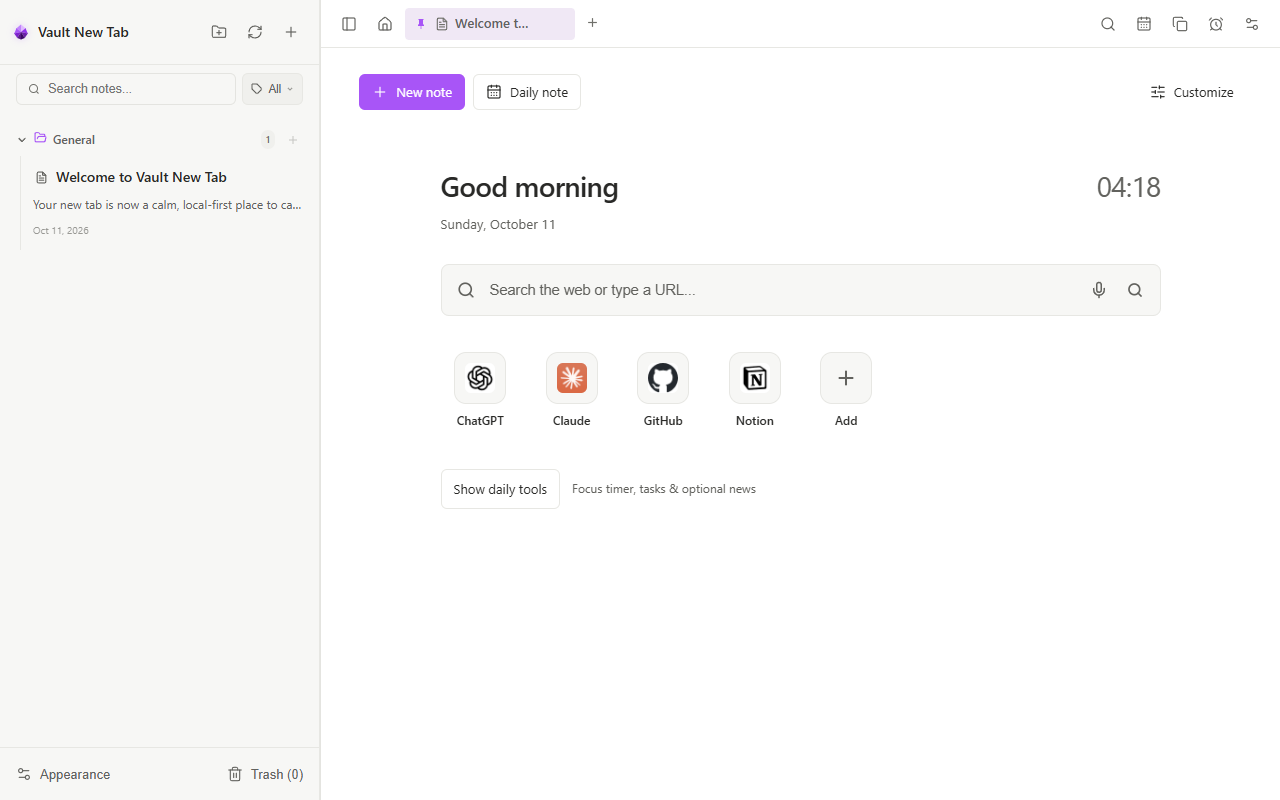 Vault NewTab: Combining local Markdown writing with an elegant daily focus dashboard.
 Why Put Notes on Your Chrome New Tab?
When inspiration strikes or a meeting produces an action item, opening a separate desktop application (like Notion, Apple Notes, or Obsidian) introduces cognitive friction. By the time the window loads, your train of thought has drifted.
A notes new tab for Google Chrome solves this by turning the most frequented surface on your computer into an immediate thinking canvas. Every time you press Ctrl + T (or Cmd + T on macOS), you are met with your active thoughts, to-do lists, and sprint objectives—not an algorithm fighting for your attention.
2026 Quick Comparison Matrix
Here is how the top 7 new tab extensions for notes compare across formatting capabilities, data privacy, and daily utility:
| Extension | Markdown | Offline Privacy | Voice Notes | Local File Sync | Price |
|---|---|---|---|---|---|
| Vault NewTab | Full (WYSIWYG & Source) | 100% Local / Zero Tracking | On-Device AI | Obsidian & Local Folders | Free |
| Momentum | Basic To-Do only | Cloud account required | No | No | Freemium ($5/mo) |
| Tabliss | Simple text widget | Local browser storage | No | No | Free & Open Source |
| Bonjourr | Quick links only | Local browser storage | No | No | Free & Open Source |
| Papier | Basic rich text | Local browser storage | No | No | Free |
| NoteBoard | Sticky note formatting | Cloud sync account | No | No | Freemium |
| Blank New Tab | None (Static page) | Zero storage | No | No | Free |
Detailed Reviews of the Top 7 Extensions
Vault NewTab — The Local-First Markdown Workspace
Vault NewTab takes the #1 spot because it is the only extension that does not treat notes as an afterthought. It provides a full-fledged, Obsidian-compatible Markdown editor built directly into an elegant daily productivity dashboard.
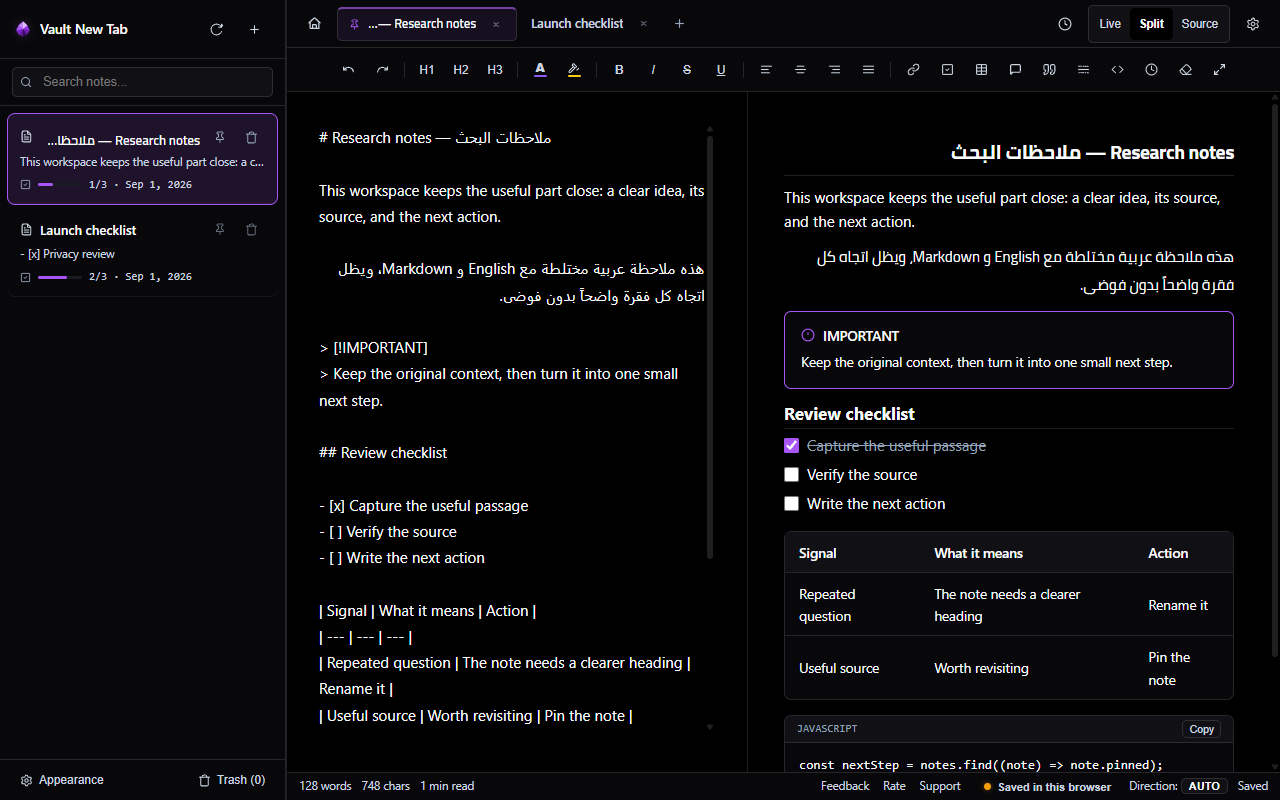 Live split-screen editing with real-time formatting, task checklists, and callout blocks.
 Why It Won Our Benchmarks:
- Three Flexible Writing Modes: Write in Live WYSIWYG mode for clean visual editing, Split-Screen mode for simultaneous source and rendered preview, or pure Source mode for keyboard purists.
- True Obsidian Vault Sync: Connect an existing folder on your computer using the native File System Access API. Your notes write directly to standard
.mdfiles without any cloud lock-in. - On-Device Voice Notes: Record spontaneous thoughts hands-free with animated audio waveforms, playback speed cycling (1x/1.25x/1.5x/2x), and offline AI transcription that never sends audio to external servers.
- Web Research Clipper: Right-click any webpage to save excerpts with automatic article titles, author tags, and source URLs saved straight to your daily scratchpad.
- Distraction-Free Focus Suite: Integrated circular Pomodoro timer, 64 curated 4K scenic wallpapers, and ambient soundscapes (rain, forest, campfire).
Pros
- 100% local storage with zero account required
- Full Markdown syntax: tables, checklists, callouts, math
- Bidirectional RTL (Arabic/Hebrew) and LTR support
- Includes squircle app launcher and Chrome Side Panel
Cons
- Feature-rich (may be more than someone wanting just 1 line of text)
Ready to upgrade your Chrome new tab?
Install Vault NewTab free on the Chrome Web Store and experience offline-first Markdown writing today.
Momentum — Best for Daily Motivation Quotes
Momentum is the pioneer of aesthetic new tab replacements with millions of active users. It greets you every morning with a scenic landscape photograph, the current time, and a central prompt: "What is your main focus for today?"
Pros & Cons:
- Pros: Stunning high-res photography, inspiring daily quotes, simple single-task focus prompt.
- Cons: Basic to-do checklist only (no Markdown, no long-form writing), requires an account, and key features like soundscapes and multi-lists require a $5/month subscription.
Tabliss — Best for Minimalist Customization
Tabliss is an open-source, lightweight new tab page that lets you place draggable widgets (clocks, greetings, weather, and simple sticky notes) over Unsplash wallpapers or solid color backgrounds.
Pros & Cons:
- Pros: Lightweight, open source, zero tracking, customizable widget positioning.
- Cons: Note widget is limited to plain text with no document management, folder trees, or Markdown export.
Bonjourr — Best for Apple-Style Aesthetics
Inspired by iOS and macOS lock screens, Bonjourr is renowned for its elegant typography and dynamic day/night ambient lighting transitions.
Pros & Cons:
- Pros: Beautiful typography, customizable search bar, very fast page load.
- Cons: Focuses on visual minimalism rather than writing; note taking is not a primary feature.
Papier — Best for Barebones Plain Scratchpad
Papier strips away all wallpapers, clocks, and widgets, presenting you with a single, clean blank sheet of paper every time you open a tab.
Pros & Cons:
- Pros: Zero distraction, immediate keyboard focus, auto-saves to local storage.
- Cons: Only supports one continuous single note (no multiple documents or folders), no app shortcuts or dashboard tools.
NoteBoard — Best for Visual Sticky Notes
If you think spatially and prefer colored Post-It notes pinned across a corkboard, NoteBoard recreates a physical desktop bulletin board inside your browser.
Pros & Cons:
- Pros: Drag-and-drop spatial organization, color-coded sticky notes, multi-board support.
- Cons: Dated visual design, lacks standard Markdown syntax, cloud sync requires paid subscription.
Blank New Tab — Best for Zero-Latency Purists
For users with older laptops who want exactly 0.0ms tab load time without any visual elements or network requests, a pure blank new tab delivers raw performance.
Pros & Cons:
- Pros: 0ms render time, consumes zero RAM or CPU.
- Cons: No notes, no shortcuts, no utility.
Key Features to Look for in a Notes New Tab
Before picking an extension, evaluate these four critical criteria:
1. Local-First Data Sovereignty
Your personal thoughts should not sit on a third-party startup's cloud server. Choose extensions that store your notes locally in standard Markdown files (.md) or IndexedDB.
2. Instant Keyboard Latency
When you open a tab to write, you should be able to type instantly. Look for extensions built without heavy telemetry scripts that open in under 50ms.
3. Full Markdown Support
Plain text notepad extensions quickly become cluttered. Markdown allows you to structure long notes with headings, checklists, code blocks, and callouts.
4. Integrated Side Panel Companion
The best extensions let you access your notes not just when opening a new tab, but side-by-side with documentation or videos using Chrome's native Side Panel.
Frequently Asked Questions (FAQ)
What is the best Chrome new tab extension for taking notes?
Vault NewTab is our top choice for 2026. It combines an offline Markdown canvas with split-screen preview, local Obsidian vault synchronization, offline voice transcription, and a macOS-style app dashboard.
Are new tab note extensions safe for my privacy?
It depends on the architecture. Extensions that require you to log in with an account typically store your notes on their servers. Vault NewTab operates 100% locally on your device with zero tracking, no accounts, and no data transmitted off your machine.
Can I sync my new tab notes with Obsidian?
Yes. Vault NewTab features native File System Access support that directly connects to any folder on your computer, allowing your Chrome new tab notes and Obsidian desktop vault to stay synchronized automatically.
Experience the #1 Rated Notes New Tab
Join thousands of writers, developers, and knowledge workers who turned Chrome into an offline-first Markdown sanctuary.
Add to Chrome